

The Three Dots in the Positions View

In my previous YouTube video I briefly described the three main tools that I use every time I am working with our investments. In this video I will focus on the “three dots” that may not be intuitive for most investors. I had to talk to a Fidelity representative to find this resource and now I use it just about every time I am doing work in Trader+.
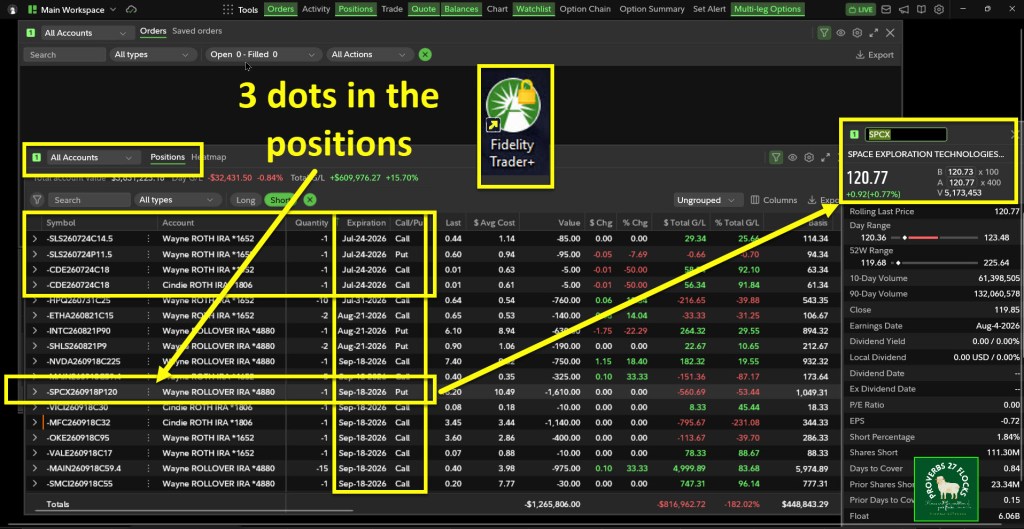
The “Positions” window shows three dots next to every long and short position. In the following image I am only looking about my “SHORT” options contracts. Between the Symbol for the option contract and the Account that holds that contract are three dots. Those dots hide a wonderful set of opportunities for various tasks.
If I was looking at LONG positions (stocks and ETFs) then the tools change. For example, if I click the three dots next to a stock I own, one of the choices that appears is “Buy More.” Other choices are “Sell All”, “Sell Specific” and “Option Chain.” I will explore those in a future training video.
What I Want to See for PUT Contracts
I currently have a PUT contract for SPCX that expires September 18, 2026. The strike price is $120. If I leave that contract as is, and the price for SPCX shares is at or below $120 when the market closes on the expiration date, then I will be obligated to purchase 100 shares. The cost will be $12,000. Because SPCX is currently trading at a price higher than that, I am still “out of the money.” The thing I look for is an orange bar to the left of the ticker symbol. When I see that I might decide to take action by rolling the contract to a different strike price and/or expiration date.
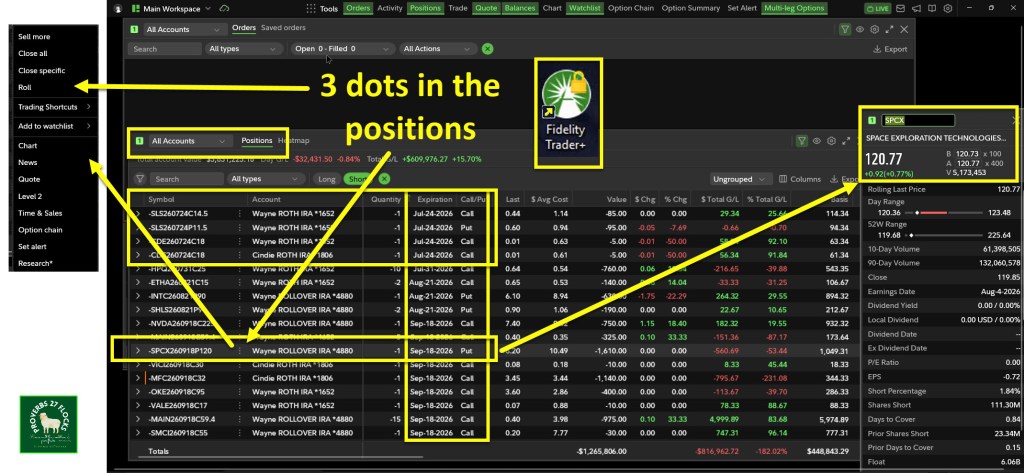
I could “ROLL” the contract to a higher or lower strike price. Depending on the new expiration date I choose and the new strike price, I could make some additional income. I might also pay to roll the contract. For example, if I wanted to roll the strike price from $120 to $110 (reducing my contract obligation by $1,000), I might have to pay $450 to exit the initial contract and get the new contract. I generally would not do that, but it is possible.
What It Looks Like
For the sake of an example, I will share a YouTube video that shows me considering a roll of the SPCX contract from $120 to $110 with a new expiration date. Here is a link to that video. The Three Dots
Two Reminders For Trading Options on Trader+
If you want to trade options on Fidelity’s platform, I highly recommend that you start using the Fidelity Trader+ software. It is free to download, install and use. It is possible to trade options on the website, but I haven’t found that to be as user friendly as Trader+.
You cannot just start trading options without requesting that functionality. You have to apply for options trading. You can do that online at the Fidelity website. Each account you manage can be set up for options trading. I think the ROTH IRA is the best account for options trading. It helps you minimize income taxes and gain real income. The traditional IRA is also a good account type, bearing in mind that you will ultimately pay income taxes on any withdrawals from that account as regular income.
Seeking Alpha Subscription Information
Of all of the resources I use, the most helpful is Seeking Alpha. The Seeking Alpha QUANT rating is a huge factor in my investment success. If you decide to explore a Seeking Alpha subscription, please use the following link. Seeking Alpha

SEEKING ALPHA INFORMATION AND SUBSCRIPTION
You can also scan this QR Code to get the same information.

Past performance does not guarantee future results, Seeking Alpha does not provide personalized advice, and it is not a registered investment adviser.
We accept advertising compensation from companies that appear on our site. This website represents my opinions, which may not reflect those of Seeking Alpha, and does not constitute an investment recommendation or advice.
If you have any questions or problems getting connected to Seeking Alpha, reach out to them with this email address: subscriptions@seekingalpha.com

