

Customizing the Experience

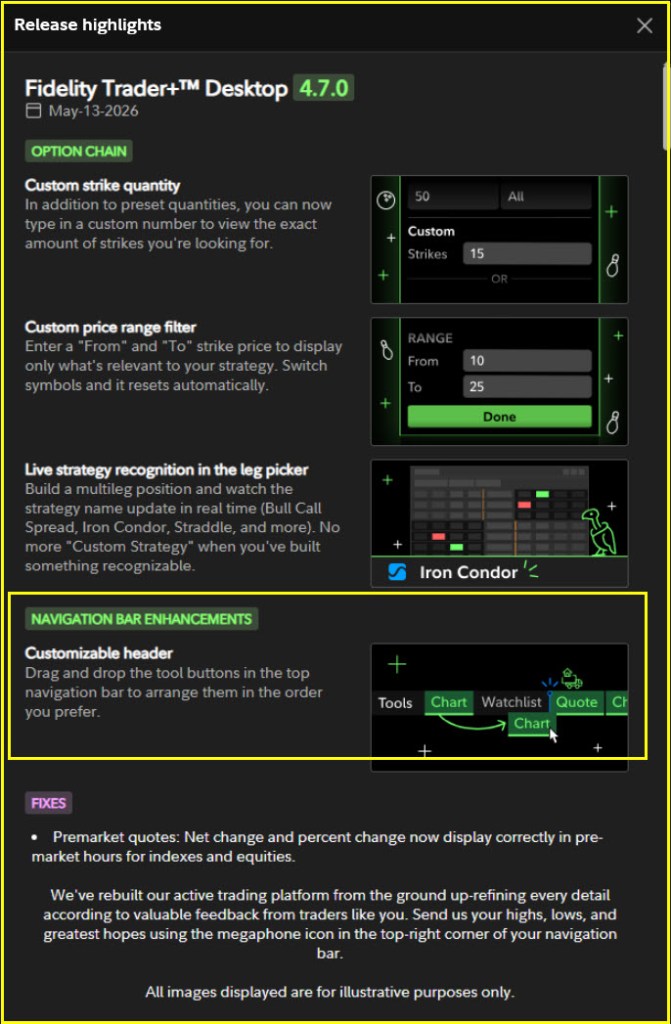
There are seven tools that I use most frequently in Fidelity’s Trader+ software. Until today, the header was not customizable. I suggested that it would be helpful for the user to be able to move the navigation tool buttons to a preferred sequence. I suspect others also wanted to have that functionality. This morning I saw in the 4.7.0 Release Notes that the tool buttons can be moved to suit my trading behaviors: “Customizable header – Drag and drop the tool buttons in the top navigation bar to arrange them in the order you prefer.”
The buttons I most frequently use are Positions, Orders, Option Summary, Option Chain, Quote, Balances, and Chart. I put them in that order in my Trader+ environment. Here is how I now have my Trader+ Desktop configured.
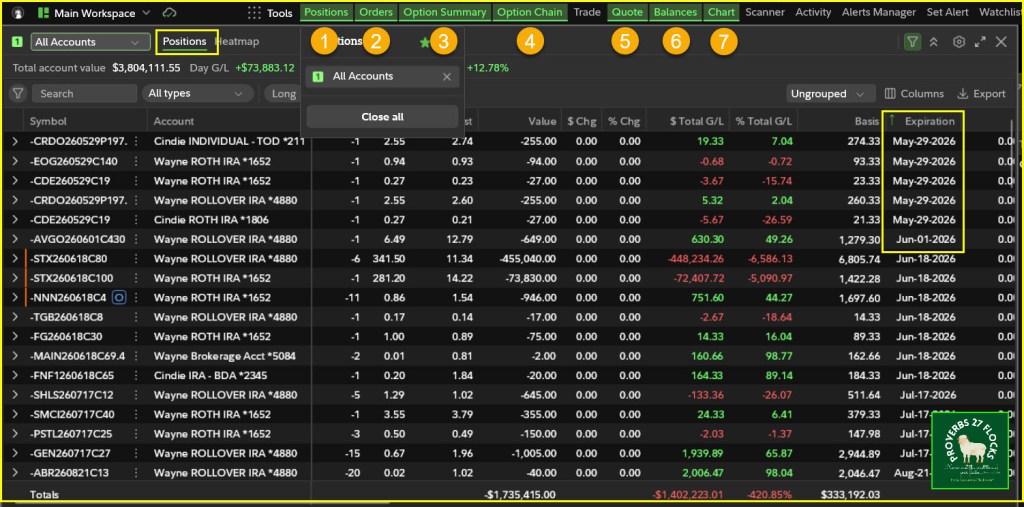
The Positions view lets me filter my positions in any way that works best for my activities. Because I am often trading covered call options or rolling those options, I often filter to see specific holdings like NVDA or CRDO. I also want to see my “long” positions (shares I own) and my “short” positions (open call and put contracts.)
Positions Example
In the following image you can see that I am looking at “All Accounts.” In addition, because I only want to see options contracts, I selected the “Short” option. Then, I clicked on the column that shows the contract “Expiration” date so that I could see options I might want to roll. Those that expire this week are of most importance.
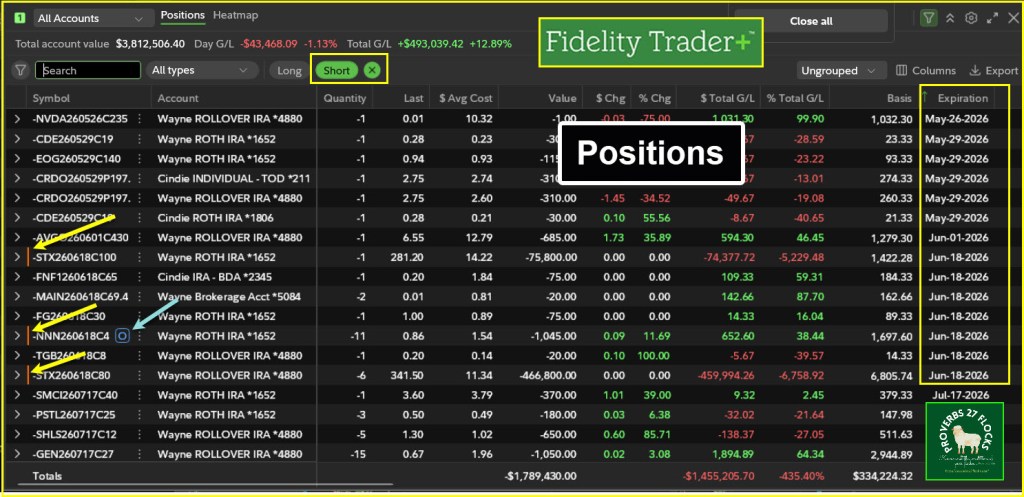
This image also provides two other helpful pieces of information. On the left side you can see that I have three positions that will likely be called. They are my STX holdings in my ROTH IRA, my traditional IRA, and my NNN position in my ROTH IRA. This is easy to spot by looking for the vertical orange bar. There is also an “O” next to the NNN position. This means I have an open order to attempt to roll the NNN contract to a higher strike price.
Orders Example
In addition to seeing the option ticker symbol in the left-most column, I can quickly see the “Action.” There are three types of actions in this display. I rolled three positions, I sold two cash covered PUT options for CRDO, and I sold six covered call options.
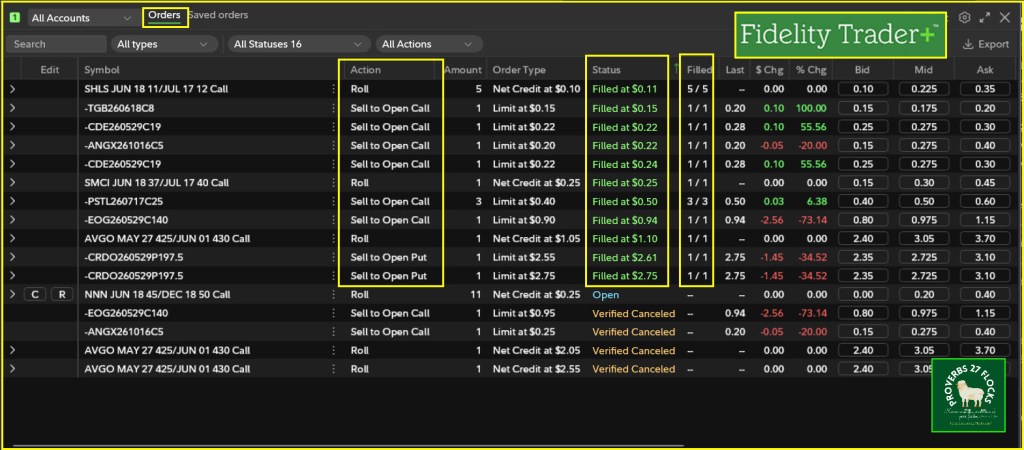
You can also see the “Status.” In some cases I got my asking price per share, and in other cases I got a price better than expected. For example, for the PSTL option contract I wanted $0.40 per share but I received $0.50 per share. If I have more than 100 shares and am trading more than one option contract, I can see the “Filled” contracts. In this case every contract was filled. “5/5” means that I had 500 shares of SHLS and I rolled the existing contract on all of the shares.
Options Contract Rolls for NVDA
It is possible to roll contracts up and down during the day. Of course, the price of the shares plays a role in the roll opportunities. This image illustrates the way I did this during a couple of minutes today with my NDVA shares. I sold a call and made a small gain of $0.42 per share. When NVDA’s share price rose, I rolled the contract up from $212.50 on May 27 to $215.00 for May 29. Then in the afternoon I rolled the contract back down to $212.50 and added more income.
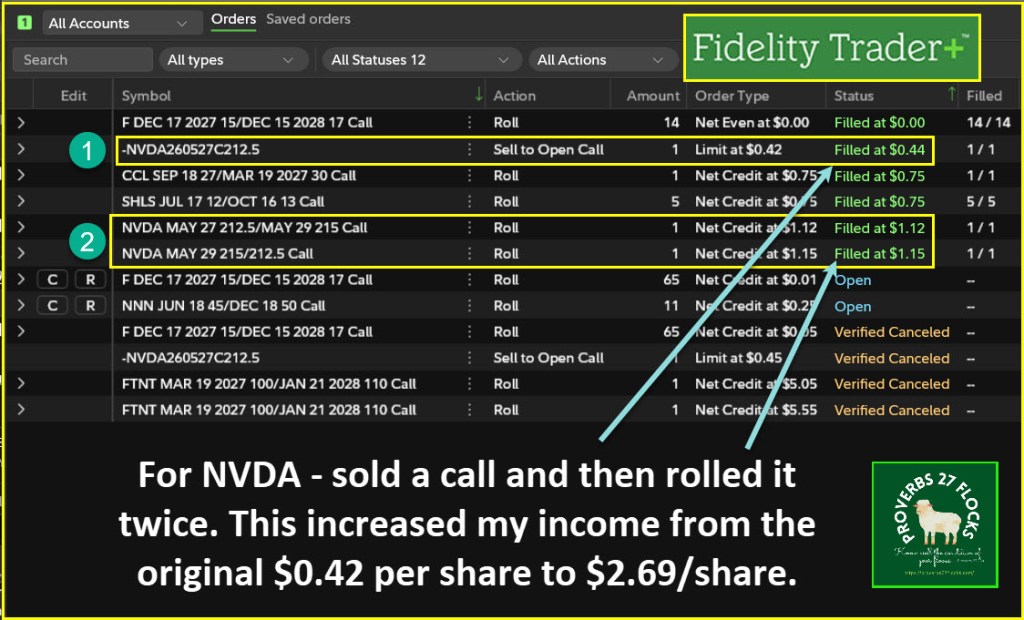
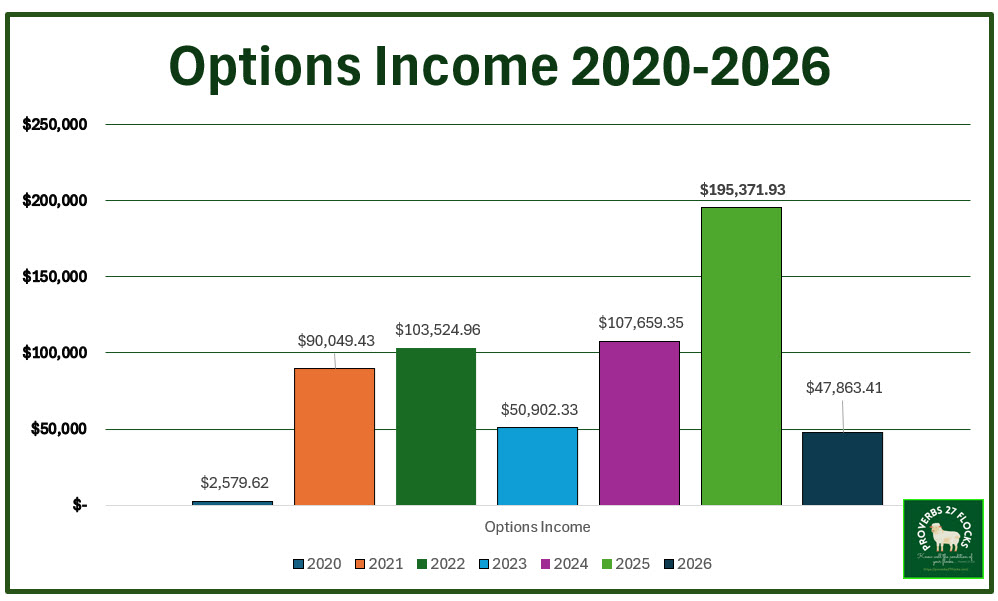
This sets me up for potential rolls during tomorrow’s market. This doesn’t mean I will see an opportunity, and I may see my shares called away on Friday if the price closes above $212.50. However, my NVDA cost basis is $171.80, so that will give me a nice profit on top of the options income. YTD options income is worth the sliver of time I spend on this effort.
Fidelity Trader+ User Guide
This is a link to Fidelity’s User Guide: TRADER+ Help Guide
Seeking Alpha Subscription Information
Of all of the resources I use, the most helpful is Seeking Alpha. The QUANT ratings is especially helpful for avoiding terrible investments. If you decide to explore a Seeking Alpha subscription, please use the following link. Seeking Alpha

SEEKING ALPHA INFORMATION AND SUBSCRIPTION
You can also scan this QR Code to get the same information.

Past performance does not guarantee future results, Seeking Alpha does not provide personalized advice, and it is not a registered investment adviser.
We accept advertising compensation from companies that appear on our site. This website represents my opinions, which may not reflect those of Seeking Alpha, and does not constitute an investment recommendation or advice.
If you have any questions or problems getting connected to Seeking Alpha, reach out to them with this email address: subscriptions@seekingalpha.com

