
Help Me Help You
When I help others one of the first things I ask to see is their most recent monthly statement. I can quickly see their investment focus or lack thereof. I also look for the fees that are being charged by their advisor. But one thing is even more helpful than a statement. That is a list of their positions.
Fidelity has a Tool For That: Portfolio Checkup Tool
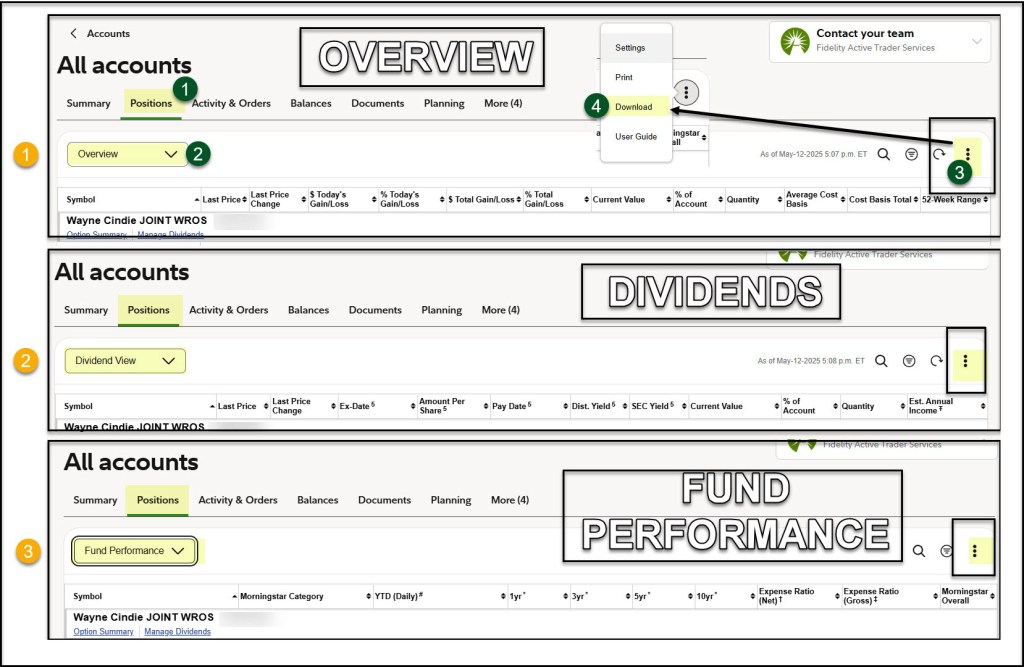
If you are on your “All Accounts” page when signed onto Fidelity, click on the “Positions” tab. Then, notice the box that says “Overview.” That is the first place you should look. If you look on the far right side of the page you will see three dots.
To download your positions to a CSV file (for import into a spreadsheet) you click the three dots and then select the DOWNLOAD option. You can name the file anything you like and save it to your computer.
Then, change “Overview” to “Dividend View.” Again, you will gain a new perspective on your holdings. If you scroll to the bottom you can see Fidelity’s estimate of your annual income from your holdings. It is somewhat deficient, as it won’t include every investment, but it is a start.
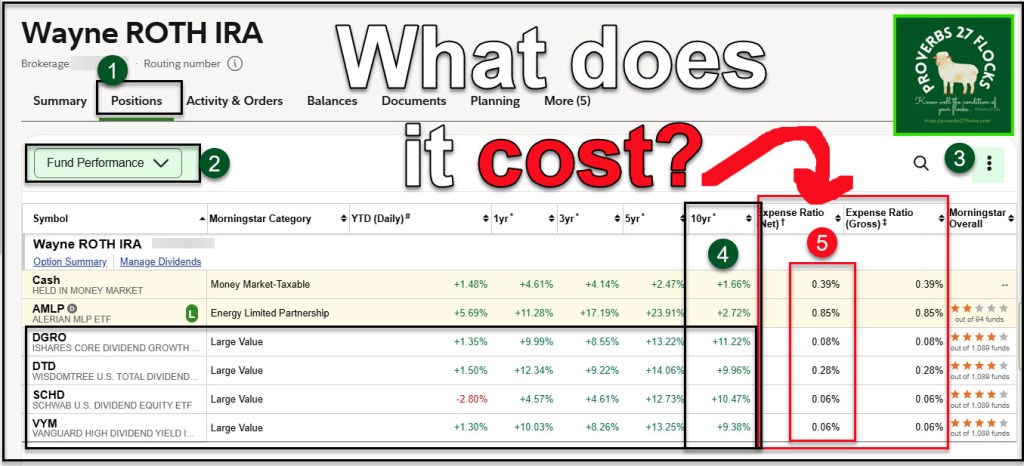
Finally, everyone should then switch from the “Dividend View” to the “Fund Performance” view. This tells a story about how expensive your holdings are. Mutual funds can be a real drain on your long-term success and results.
What About Account Activity?
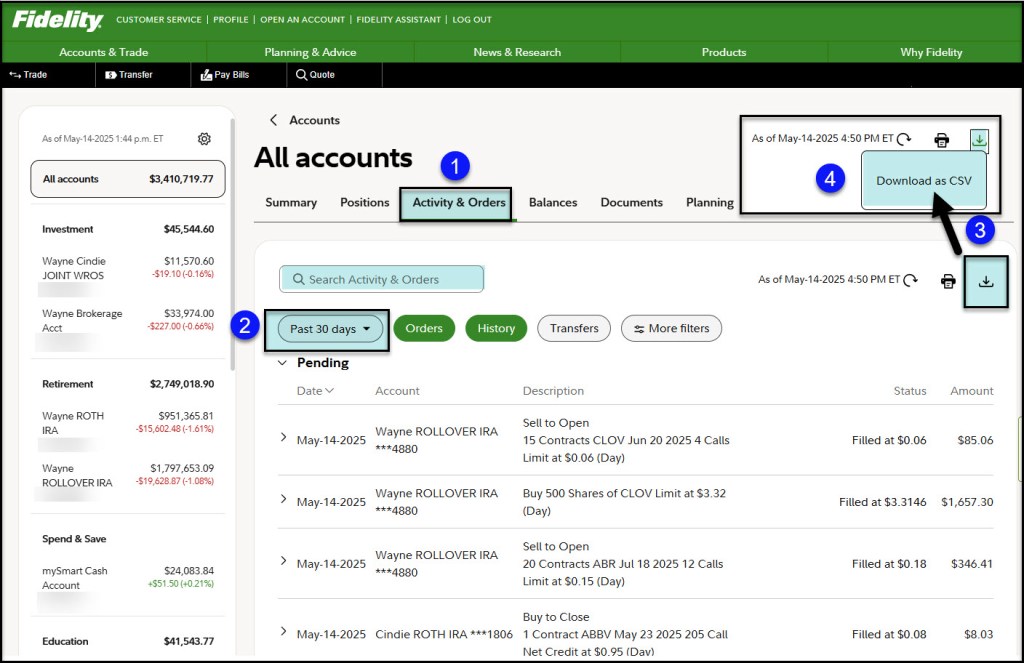
You can also see what is going on with your accounts. For example, to quickly see dividends that have been received, you can go to the Activity & Orders tab. If you ever wondered how I can so quickly report on dividends received or option income, it is from downloading activity as a CSV file. I then add new activity to my master spreadsheet that I have named “Accounts_History-NEW-2025.xlsx.” This spreadsheet has information going back to 2016. Therefore, for example, if I want to see all of my dividend income and/or options income for our ABBV shares, I can quickly filter the spreadsheet and come up with the answers.
Filter Your Positions
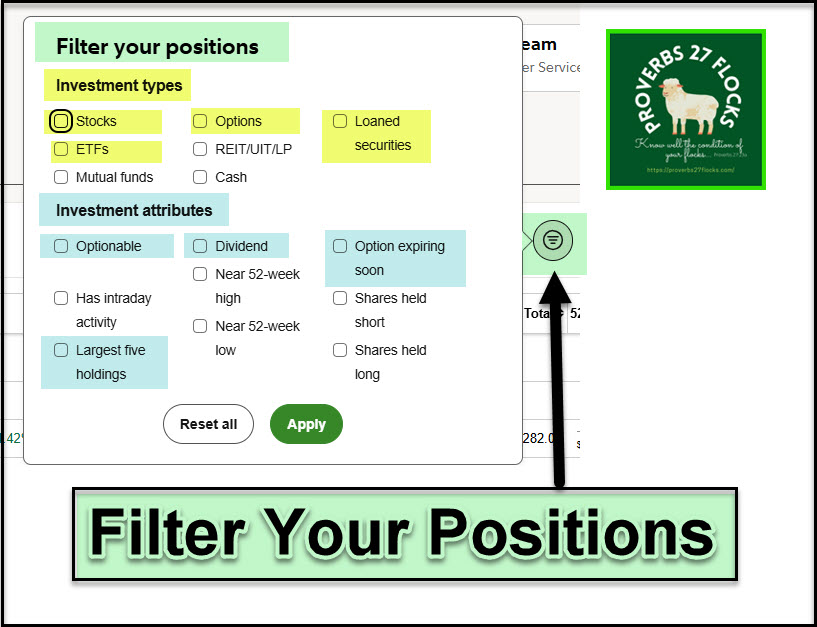
Before I forget, there is one other feature in the Positions tab. I don’t find it very useful for most things, but it might prove useful at times. You can filter your positions by various attributes. I tried some of them just to see what they would display.
Thank You
I want to thank three readers for using my Seeking Alpha link to order your Seeking Alpha subscription. I don’t know who you are, but I did receive compensation from Seeking Alpha for the referrals. Thank you for using the link!
Seeking Alpha Subscription Information
Of all of the resources I use, the most helpful is Seeking Alpha. If you decide to explore a Seeking Alpha subscription, please use the following link. Seeking Alpha
SEEKING ALPHA INFORMATION AND SUBSCRIPTION
You can also scan this QR Code to get the same information.
Past performance does not guarantee future results, Seeking Alpha does not provide personalized advice, and it is not a registered investment adviser.
We accept advertising compensation from companies that appear on our site. This website represents my opinions, which may not reflect those of Seeking Alpha, and does not constitute an investment recommendation or advice.
 Know Your Flocks & Herds