
Keeping It Simple
On January 30, 2024, I did a blog post about how to do a low-cost cash covered put option trade using PLTR (Palantir Technologies Inc) as an example. The title of that post was “Option Trade for Less Than Two Thousand Dollars.”
In that post I said I set aside $5,100 for PLTR shares at $17 per share. That meant I was willing to buy 300 shares for a total of $5,100. To get this opportunity, I had to spend $67.95 to buy three call option contracts, representing a total of 300 shares. On February 5 I received the 300 shares for the contract price of $17/share. I then sold 100 of the shares for $22.05 on February 6, and another 100 shares for $20.00 that same day. This gave me a net profit of $805 in just a couple of days.
However, that also means I still own 100 shares of PLTR. Yesterday PLTR closed at 23.81. So I could just sell the shares and finalize my profit. Instead, I sold a covered call on the shares for a profit of $35.32. But that isn’t all. I did the same thing on February 8 ($15.32), February 20 ($28.32), and February 26 ($36.32), for a total covered call profit of $115.28.
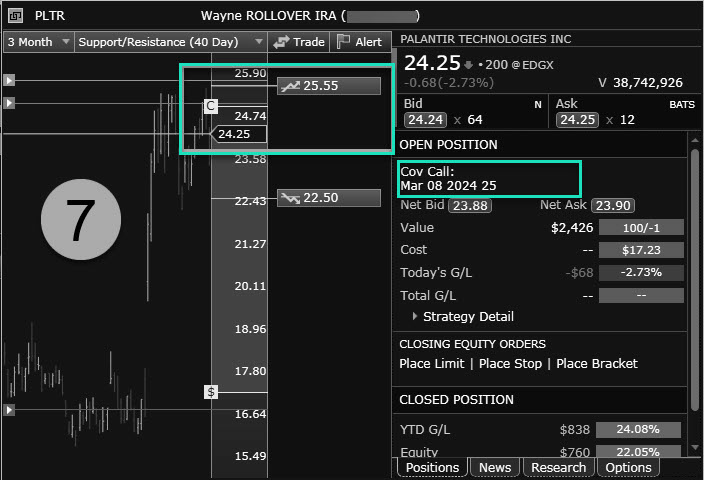
The easy six steps will be explained in pictures. First of all, this first image shows the situation before I entered the covered call option trade. Although the Fidelity Active Trader Pro software is good, sometimes there is a lag in the update of the profits. In this image my total profit from the sale of 200 shares of PLTR and the options trades is $838. That is less than my true profit. You can also see that I still have 100 shares and my cost basis for those shares is $17.23 per share. The cost basis is more than the original $17/share because I bought a call and that cost was added to the shares.

STEP NUMBER ONE
The first step is to evaluate the PLTR investment. This second image shows that various analysts have a less than enthusiastic view of PLTR as an investment. The ESS is 3.4, which means they aren’t eager to buy or eager to sell shares if they own shares. The next earnings report isn’t due out until May 6 and PLTR doesn’t pay a dividend. Usually I avoid trading an option too close to an earnings date or an ex-dividend date. However, neither of those is true, so we move to step two.

STEP TWO
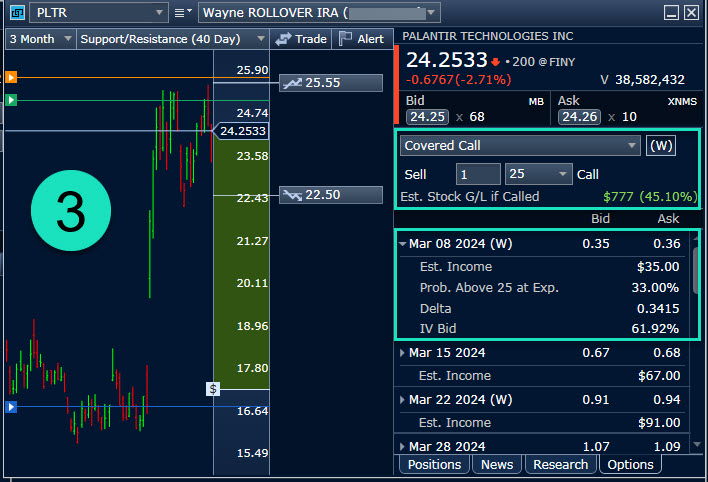
The third screen shows that I am willing to sell my remaining 100 shares for $25 per share, but only if the shares reach that price by Friday, March 8. If this contract price is reached, I will make a profit of $777. The probability that the shares will reach $25 at the close on Friday is 33.00% and this trade has a potential immediate profit of $0.35 per share, or $35.00 of estimated income before any options trading commissions.
STEP THREE
In screen number four I entered my desired price of $0.35 for a contract that expires on Friday. The “TIF” is the time in force. In other words, if the contract doesn’t fill before the market closes, then I don’t get the trade and I try again tomorrow. Notice at the bottom the “Bid” and “Ask” prices. The bid is the price someone is willing to pay for my contract, and the ask is the price other options traders want for the same contract I am selling.

STEP FOUR
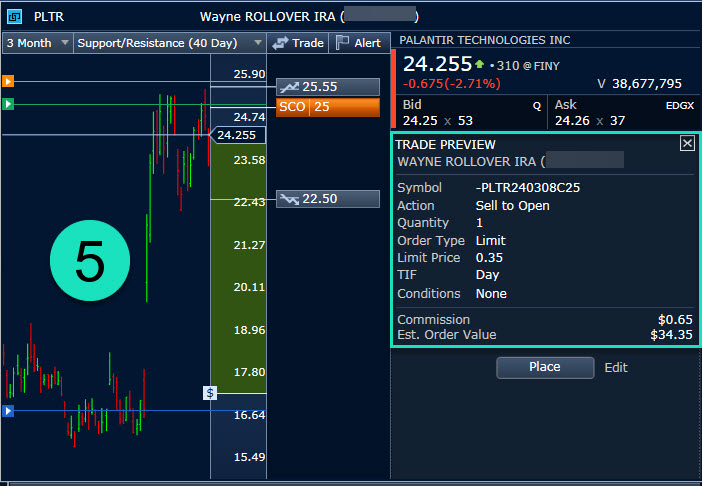
In screen number five I have an opportunity to review my proposed trade. As you can see, there is a $0.65 commission on this option trade. That means my total real profit can only be $34.35. However, bear in mind that this total trade only took me about five minutes, so that is a good return on my time. I can take Cindie out for lunch with this return and still have money left over. All I have to do is click on “Place” and the order enters the options trading market.
STEP FIVE
The sixth screen is really just confirming that my order was received by Fidelity. In other words, all I have to do is click “OK.” The seventh screen shows the order was filled. Now I will wait until Friday to see if my contract is called. If it isn’t I can enter a new covered call next week.

OTHER TRADES
PLTR isn’t the only option trade I did this week. I also rolled some previous covered call contracts for AVGO and QCOM. Because those shares are more expensive, I was able to make some nice profits of $323.70 for QCOM and $1,229.70 for AVGO. That brings my total options trading profits to $1,588.75 in just two days and about 20 minutes of work.
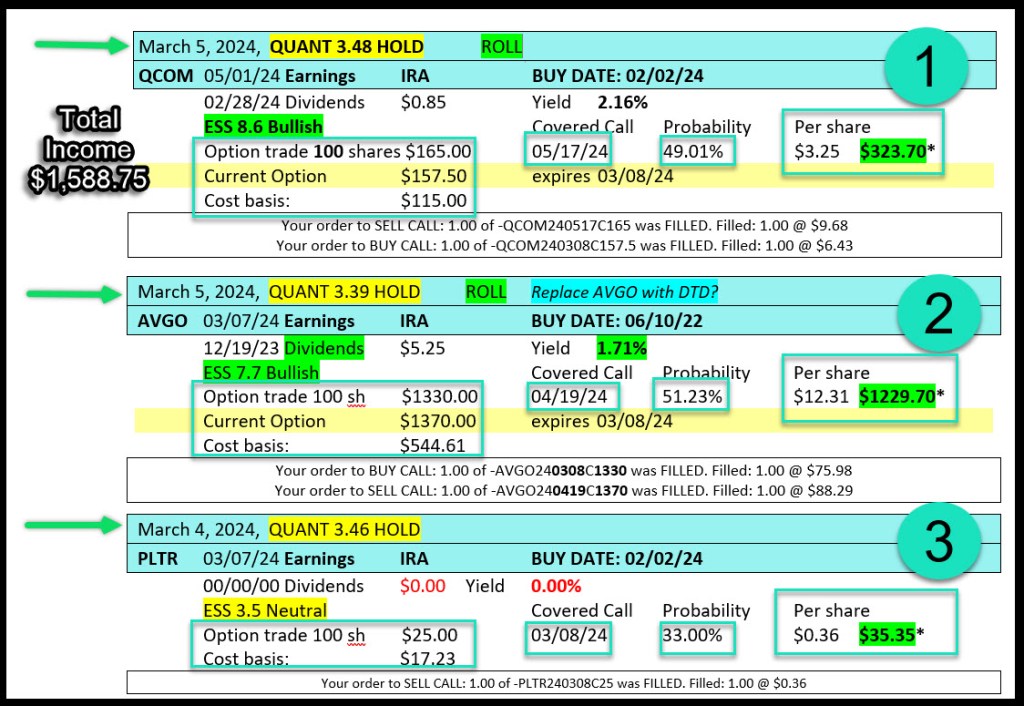
This is the way I keep track of my options trades in a Word document. I also use Excel, but this is just a bit easier to read.
Training Via Zoom in April
I realize this may still be confusing, so I am contemplating doing a Zoom training session to show the steps I use for trading options using Fidelity’s Active Trader Pro. The problem is that many of my readers work during the time that the stock market is open. However, perhaps a “lunch hour” Zoom call might work for some of you. If so, let me know which days of the week work best for you, bearing in mind that I am in the central time zone. I could start the call at 11:30 AM CST if anyone is interested. The training would be scheduled for some day in April. There would be no cost for the training but it might take more than one session if there are a lot of questions.
I will need your email address to schedule the training via Zoom, and you would have to have a computer with Zoom installed. You can get the software at this link: ZOOM
 Know Your Flocks & Herds
Hi Wayne, I enjoyed your blog on the Six Steps for a Covered Call Option Trade and would be interested in doing a Zoom training call. Please count me in if and when you do the training. Thank you for the blogs! They are very helpful. Brad Dickinson ________________________________
LikeLike